PoolEdit - Open Source XML ISO 11783 User Interface Editor
http://autsys.tkk.fi/en/Farmix/PoolEdit
Wednesday, December 16, 2015

Sunday, May 27, 2012
OV3640 CMOS Camera Module All Documents
I finally downloaded the firmware level application notes for Auto-Focusing OV3640 CMOS camera module. And also I found some source codes for firmware level (Auto-focus). That means we now control VCM (Voice Coil Motor) in OV3640 module. In our module used the embedded auto-focus solution.
full size
The following links have app-notes and sources:
link
 |
| In side of OV3640 CMOS Camera Module |
The following links have app-notes and sources:
link
Sunday, April 8, 2012
LEGO NXT- Bluetooth communication for multi robots
The follow links have useful information about Bluetooth for multi-robots.
http://lejos.sourceforge.net/forum/viewtopic.php?t=1964&start=15
http://lejos.sourceforge.net/forum/viewtopic.php?t=1785
http://lejos.sourceforge.net/forum/viewtopic.php?t=439
http://pirate.shu.edu/~wachsmut/Teaching/CSAS-Robotics/Lectures/12-BTCommunication.doc
http://www.juanantonio.info/p_articles/archive/2008/LEJOS-BLUETOOTH.pdf
http://lejos.sourceforge.net/nxt/nxj/tutorial/Communications/Communications.htm
Sunday, March 18, 2012
Compact Camera Module
Concept
CCM, acronym of Compact Camera Module, is always used in cell phone. So it has another name, cell phone camera module. The sensor type used in this kind of module is CMOS or CCD.

Types
(1) Differentiated by sensor :
A. CCD-Charge Couple Device
B. CMOS-Complementary Metal Oxide Semiconductor.
Compared with CCD , CMOS sensor have smaller size, lower consumption, better integration and lower Cost.
(2) Differentiated by manufacture technics :
A. CSP-Chip Scale Package
Some kinds of packaged sensor are used in CSP process. It is convenient to make module with packaged sensor. There are no obvious performance differences between CSP and COB type in low pixel module, such as VGA and 1.3 Mega pixel.
B. COB-Chip On Board
Unpackaged sensor separated from the wafer are directly used in COB process. The image performance or COB type is better than CSP because no additional glass is covered on the senor. And the module height is lower.
(3) Differentiated by lens :
AF (Auto Focus Lens) Working Concept
Using Voice Coil Motor (VCM) for lens movement.
VCM use the Lorentz force which is generated from the energized coils and the permanent magnets for moving the Lens.
Offering CCM for applications
•Cell phone, video phone
•PDA, PMP,MP4
•Vehicle-mounted camera-car reverse camera
•Toy
•Scope and security system
•Medical product
•DSC
•PC camera, laptop/notebook camera, webcam
Standard CCM Selection Table

Monday, February 13, 2012
Тэнгэр шиг бай
Хамаг бүгдээр чамайг
Харааж нулимж байвч тэнгэр шиг бай
Хамгийн сайн хүмүүс гэж
Хашгирч ерөөж байвч тэнгэр шиг бай
Тэвчээр барагдаж, нөхөд чинь орхивч
Тэнгэр шиг бай, мөнхөд амгалан
Тэргэнд суулгаж алтан титэм өмсгөвч
Тэнгэр шиг бай, юу ч болоогүй юм шиг
Хамгийн хайртай хүн чинь хаяж одсон ч
Хан тэнгэр нурчихаагүй цагт бүү зов
Гүтгэж доромжилж бахаа ганц хангавч
Гүн тэнгэр хэмхрээгүй цагт бүү ай
Өвчин зовлонд нэрвэгдэж тартагтаа тулавч
Өнө мөнхийн тэнгэр шиг бай, чи ялна
Өрөөл бусдад тоогдохоо байж мартагдавч
Өндөр тэнгэр дээр чинь цэлийж буйг бүү март
Яг л амьдрал чинь дуусаж, явах замгүй болсон ч
Яадгаан алдалгүй хүлээ, тэнгэр шиг бай
Яаруухан санаа мөхөсдөж, хулгай зэлгийд өртсөн ч
Ядмагхан амьтдыг бүү тоо, тэнгэр шиг бай
Олз омог чамд үүдээ хаасан ч тэнгэр шиг бай
Олон түмэн нүүрээ бууруулсанч тэнгэр шиг бай
Одод гялалзаж наран саран ээлжлэх цагт
Орчлон дээр аавын хүү шантрах ёсгүй
...
Очирбатын Дашбалбар
Wednesday, January 25, 2012
Saturday, January 14, 2012
Project Load Failure

I meet some trouble for VS2005 Project load. I found some error fixing methods from some blog.
Try out the following
1. For each user on the machine remove the %userprofile%\Local Settings\Application Data\Microsoft\CoreCon\1.0 Folder and all files under it.
2. For each user on the machine rename the %userprofile%\Application Data\Microsoft\Device Emulator\ folder to %userprofile%\Application Data\Microsoft\Device Emulator_B2\
1. For each user on the machine remove the %userprofile%\Local Settings\Application Data\Microsoft\CoreCon\1.0 Folder and all files under it.
2. For each user on the machine rename the %userprofile%\Application Data\Microsoft\Device Emulator\ folder to %userprofile%\Application Data\Microsoft\Device Emulator_B2\
3. Repair the Windows Mobile 5.0 SDKs
Monday, December 26, 2011
Youtube ийн нууц аргууд
Видеог илүү өндөр нягтралтайгаар үзэх боломж:
YouTube дээр видео үзэж байхад заримдаа видеоноос баруун доод хэсэгт "Watch in High Quality” гэсэн бичиг гарсан байхыг та ажиглаж байсан уу?
Видеог анх харуулахдаа 320x240 цэгийн хэмжээтэйгээр 320 Kb/s давтамжтайгаар гаргадаг. Энэ нь идеог тасралтгүй үзэхэд хангалттай байдаг. Гэхдээ та "Watch in High Quality” хэрэглэж видеог илүү чанартай, нягтрал сайтай үзэх боломжтой. Мэдээж интернетийн хурд нь илүү өндөр хүмүүст зориулан энэхүү сонголтыг оруулж өгчээ.
"Watch in High Quality” товчийг HQ гэж улаан фон дээр тэмдэглэсэн хэсгээс та харж болно. Жишээг доорх линкээс хараарай. http://www.youtube.com/watch?v=MBGeNeofk0A
Хэрэв та "Watch in High Quality” линк дээр дарах юм бол видео дахин ачааллах бөгөөд энэ удаа MP4 хувилбар бүхий 480*360 хэмжээтэй 512 Kb/s давтамжтай видео гарч ирнэ.
Хэрэв таны интернэт холболтын хурд хангалттай хурдан бол анхнаасаа л видеог өндөр чанартайгаар үзэх боломжтой ингэхийн тулд URL-ын ард &fmt=18 гэсэн бичиг нэмэх хэрэгтэй. Тухайлбал: http://www.youtube.com/watch?v=MBGeNeofk0A&fmt=18
Ингэснээр шууд л Өндөр чанартай видео нь гарч ирэх болно.
Зөвлөмж №2
Видеог дундаас нь үзэж эхлэх боломж :
Зарим видеонд хэт их дэмий дүрстэй байдаг нь бидний алтан цагаас хомслож байдаг. Бүр зарим тохиолдолд 3 минутын видеоноос зөвхөн дунд хэсэгт байгаа 1 минут гарах хэсгийг үзмээр санагддаг шүү дээ. Тэгвэл та туршлагатай интернет хэрэглэгчдийн нэгэн адил хэрэггүй title, редокторын үг зэргийг алгасаж видеогоо үзэж чадах болно.
Тухайлбал: Та тухайн видеоны 53 дахь секундээс эхлүүлье гэвэл #t=53 гэсэн үгийг URL-ын араас залган бичнэ. http://www.youtube.com/watch?v=MBGeNeofk0A#t=53
Тухайн гарах видеон URL-ын араас #t= таны хүссэн тоо залган бичсэний дараа дахин видеог ачааллуулаарай. Видео эхлэхдээ шууд л та 53 гэж бичсэн бол 53, 70 гэж бичсэн бол 70 дахь секундээсээ эхлэх болно.
Өөр боломж
1. Бичлэгүүдийг өндөр чанартайгаар үзэх
Тухайн бичлэгний хаяг буюу URL ийн ард &fmt=18 эсвэл &fmt=22 гэж бичээд ENTER дар
2. Сайт дээр бичлэг өндөр чанартайгаар байршуулах
Хэрэв та вэбсайт эсвэл блогтой бол YouTube ээс бичлэг авч хүргэдэг байх тэгвэл Embed кодний ардаас нь &ap=%2526fmt%3D18 гэж бичвэл тухайн бичлэг танай сайт дээр илүү гоё гарах болно #adi_top_right{position:fixed;_position:absolute;top:0px;right:0px;clip: inherit;_top:expression(document.documentElement.scrollTop+document.documentElement.clientHeight-this.clientHeight);_left:expression(document.documentElement.scrollLeft + document.documentElement.clientWidth - offsetWidth);}#cot_tl_pop {background-color: transparent;position:fixed;_position:absolute;height:194px;width: 244px;border: thin solid #000000;right: 100px;top: 30px;overflow: hidden;visibility: hidden;z-index: 100;_top:expression(document.documentElement.scrollTop-20+document.documentElement.clientHeight-this.clientHeight);}
1. Бичлэгүүдийг өндөр чанартайгаар үзэх
Тухайн бичлэгний хаяг буюу URL ийн ард &fmt=18 эсвэл &fmt=22 гэж бичээд ENTER дар
2. Сайт дээр бичлэг өндөр чанартайгаар байршуулах
Хэрэв та вэбсайт эсвэл блогтой бол YouTube ээс бичлэг авч хүргэдэг байх тэгвэл Embed кодний ардаас нь &ap=%2526fmt%3D18 гэж бичвэл тухайн бичлэг танай сайт дээр илүү гоё гарах болно
3. Видеог дуртай хэсгээсээ үзэх
Хэрвээ та үзэж байгаа видеогоо дуртай хэсгээсээ үзмээр байвал тухайн бичлэгний хаяг буюу URL ийн ардаас нь #t=XXmYYs гэж бичээрэй мэдээж XX ийн ард минут, YY ийн ард секундын бичнэ жишээ: #t=03m22s
4. Related Videos гаргаж ирэхгүй байх
Таны нэмсэн видео сайт дээрээ гарж дуусчаад ардаас нь Related Videos гэд гараад ирдэг билээ. Тэр нь хүмүүст өөр бичлэг үзэх боломж өгч байгаа юм тиймээс та Embed кодны араас нь &rel=0 гэж бичвэл Related Videos гарж ирэхгүй
5. YouTube дээр яаж насанд хүрэгчдэд зориулсан видео үзэх вэ?
YouTube дээр порно байдаггүй ч насанд хүрэгчдэд зориулсан видео ихээр байдаг, тиймээс зарим видео үзэх гэхээр насанд хүрсэн гэдгээ баталгаажуул гээд байдаг. Тэгвэл тухайн бичлэгний URL ийн урд nsfw гэж бич, жишээ нь: http://www.nsfwyoutube.com/xyz
6. Таны интернэт удаан болхоор бичлэг үзэж чадахгүй байвал
Feather Beta руу ороод Join the "Feather" Beta гэснийг сонго ингэснээр та YouTube ийг хөнгөн хэлбэр дээр үзэж болно.
7. YouTube ээс кино үзэх
Зарим хүмүүс YouTube дээр бичлэг л байдаг гэж боддог үгүй ээ, тэнд юм бүр бий кино үзмээр байвал youtube.com/movies луу ор
8. YouTube ийн бичлэгээс хэдэн хоромийг нь л тасдаж авах
Зарим видео дээр маш гоё үеүүд байдаг боловч бусад үеүүд нь гутаагаад залхуу хүргээд байдаг, тэгвэл та Splicd болон Tubechop ийг хэрэглэж хэдэн хоромийг нь л тасдаж авч болно
9. MP3 форматтай аяыг YouTube лүү Upload хийх
Зарим хүмүүс YouTube - д ганцхан бичлэг оруулах боломжтой гэж боддог, үгүй ээ та MP3 оруулаад урд нь нэг зураг л оруулахад хангаллтай, Тэр боломжийг өгдөг сайт бол MP32Tube юм
10. YouTube ийн бичлэгийг хүссэн форматаар татах
Ipod, утас, Мак, РС гээд олон төрлийн форматаар бичлэг татах бол http://www.all2convert.com/ ийг хэрэглээрэй
YouTube дээр видео үзэж байхад заримдаа видеоноос баруун доод хэсэгт "Watch in High Quality” гэсэн бичиг гарсан байхыг та ажиглаж байсан уу?
Видеог анх харуулахдаа 320x240 цэгийн хэмжээтэйгээр 320 Kb/s давтамжтайгаар гаргадаг. Энэ нь идеог тасралтгүй үзэхэд хангалттай байдаг. Гэхдээ та "Watch in High Quality” хэрэглэж видеог илүү чанартай, нягтрал сайтай үзэх боломжтой. Мэдээж интернетийн хурд нь илүү өндөр хүмүүст зориулан энэхүү сонголтыг оруулж өгчээ.
"Watch in High Quality” товчийг HQ гэж улаан фон дээр тэмдэглэсэн хэсгээс та харж болно. Жишээг доорх линкээс хараарай. http://www.youtube.com/watch?v=MBGeNeofk0A
Хэрэв та "Watch in High Quality” линк дээр дарах юм бол видео дахин ачааллах бөгөөд энэ удаа MP4 хувилбар бүхий 480*360 хэмжээтэй 512 Kb/s давтамжтай видео гарч ирнэ.
Хэрэв таны интернэт холболтын хурд хангалттай хурдан бол анхнаасаа л видеог өндөр чанартайгаар үзэх боломжтой ингэхийн тулд URL-ын ард &fmt=18 гэсэн бичиг нэмэх хэрэгтэй. Тухайлбал: http://www.youtube.com/watch?v=MBGeNeofk0A&fmt=18
Ингэснээр шууд л Өндөр чанартай видео нь гарч ирэх болно.
Зөвлөмж №2
Видеог дундаас нь үзэж эхлэх боломж :
Зарим видеонд хэт их дэмий дүрстэй байдаг нь бидний алтан цагаас хомслож байдаг. Бүр зарим тохиолдолд 3 минутын видеоноос зөвхөн дунд хэсэгт байгаа 1 минут гарах хэсгийг үзмээр санагддаг шүү дээ. Тэгвэл та туршлагатай интернет хэрэглэгчдийн нэгэн адил хэрэггүй title, редокторын үг зэргийг алгасаж видеогоо үзэж чадах болно.
Тухайлбал: Та тухайн видеоны 53 дахь секундээс эхлүүлье гэвэл #t=53 гэсэн үгийг URL-ын араас залган бичнэ. http://www.youtube.com/watch?v=MBGeNeofk0A#t=53
Тухайн гарах видеон URL-ын араас #t= таны хүссэн тоо залган бичсэний дараа дахин видеог ачааллуулаарай. Видео эхлэхдээ шууд л та 53 гэж бичсэн бол 53, 70 гэж бичсэн бол 70 дахь секундээсээ эхлэх болно.
Өөр боломж
1. Бичлэгүүдийг өндөр чанартайгаар үзэх
Тухайн бичлэгний хаяг буюу URL ийн ард &fmt=18 эсвэл &fmt=22 гэж бичээд ENTER дар
2. Сайт дээр бичлэг өндөр чанартайгаар байршуулах
Хэрэв та вэбсайт эсвэл блогтой бол YouTube ээс бичлэг авч хүргэдэг байх тэгвэл Embed кодний ардаас нь &ap=%2526fmt%3D18 гэж бичвэл тухайн бичлэг танай сайт дээр илүү гоё гарах болно #adi_top_right{position:fixed;_position:absolute;top:0px;right:0px;clip: inherit;_top:expression(document.documentElement.scrollTop+document.documentElement.clientHeight-this.clientHeight);_left:expression(document.documentElement.scrollLeft + document.documentElement.clientWidth - offsetWidth);}#cot_tl_pop {background-color: transparent;position:fixed;_position:absolute;height:194px;width: 244px;border: thin solid #000000;right: 100px;top: 30px;overflow: hidden;visibility: hidden;z-index: 100;_top:expression(document.documentElement.scrollTop-20+document.documentElement.clientHeight-this.clientHeight);}
1. Бичлэгүүдийг өндөр чанартайгаар үзэх
Тухайн бичлэгний хаяг буюу URL ийн ард &fmt=18 эсвэл &fmt=22 гэж бичээд ENTER дар
2. Сайт дээр бичлэг өндөр чанартайгаар байршуулах
Хэрэв та вэбсайт эсвэл блогтой бол YouTube ээс бичлэг авч хүргэдэг байх тэгвэл Embed кодний ардаас нь &ap=%2526fmt%3D18 гэж бичвэл тухайн бичлэг танай сайт дээр илүү гоё гарах болно
3. Видеог дуртай хэсгээсээ үзэх
Хэрвээ та үзэж байгаа видеогоо дуртай хэсгээсээ үзмээр байвал тухайн бичлэгний хаяг буюу URL ийн ардаас нь #t=XXmYYs гэж бичээрэй мэдээж XX ийн ард минут, YY ийн ард секундын бичнэ жишээ: #t=03m22s
4. Related Videos гаргаж ирэхгүй байх
Таны нэмсэн видео сайт дээрээ гарж дуусчаад ардаас нь Related Videos гэд гараад ирдэг билээ. Тэр нь хүмүүст өөр бичлэг үзэх боломж өгч байгаа юм тиймээс та Embed кодны араас нь &rel=0 гэж бичвэл Related Videos гарж ирэхгүй
5. YouTube дээр яаж насанд хүрэгчдэд зориулсан видео үзэх вэ?
YouTube дээр порно байдаггүй ч насанд хүрэгчдэд зориулсан видео ихээр байдаг, тиймээс зарим видео үзэх гэхээр насанд хүрсэн гэдгээ баталгаажуул гээд байдаг. Тэгвэл тухайн бичлэгний URL ийн урд nsfw гэж бич, жишээ нь: http://www.nsfwyoutube.com/xyz
6. Таны интернэт удаан болхоор бичлэг үзэж чадахгүй байвал
Feather Beta руу ороод Join the "Feather" Beta гэснийг сонго ингэснээр та YouTube ийг хөнгөн хэлбэр дээр үзэж болно.
7. YouTube ээс кино үзэх
Зарим хүмүүс YouTube дээр бичлэг л байдаг гэж боддог үгүй ээ, тэнд юм бүр бий кино үзмээр байвал youtube.com/movies луу ор
8. YouTube ийн бичлэгээс хэдэн хоромийг нь л тасдаж авах
Зарим видео дээр маш гоё үеүүд байдаг боловч бусад үеүүд нь гутаагаад залхуу хүргээд байдаг, тэгвэл та Splicd болон Tubechop ийг хэрэглэж хэдэн хоромийг нь л тасдаж авч болно
9. MP3 форматтай аяыг YouTube лүү Upload хийх
Зарим хүмүүс YouTube - д ганцхан бичлэг оруулах боломжтой гэж боддог, үгүй ээ та MP3 оруулаад урд нь нэг зураг л оруулахад хангаллтай, Тэр боломжийг өгдөг сайт бол MP32Tube юм
10. YouTube ийн бичлэгийг хүссэн форматаар татах
Ipod, утас, Мак, РС гээд олон төрлийн форматаар бичлэг татах бол http://www.all2convert.com/ ийг хэрэглээрэй
Sunday, December 25, 2011
Notepad++ - replace line break \n\r ...
Notepad++ - replace a pattern with line break then sort line in the order
There are something new in the Notepad++ 5.0.
I can replace a pattern with line break.
Let's say I have
for example:
7E18, 1801A, 7F19, 7D16, -20, 7F17, 18118, 38317, 38315, -20
I enter CTL+F to open Find, then switch to Replace.
In Find What, I enter "-20 " and Replace With \n, then I need to check Search Mode > Extended (\r ...). Then hit "Replace All" button.
I got
7E18, 1801A, 7F19, 7D16,
7F17, 18118, 38317, 38315,
That's all.
This method is very helpful for my work.
There are something new in the Notepad++ 5.0.
I can replace a pattern with line break.
Let's say I have
for example:
7E18, 1801A, 7F19, 7D16, -20, 7F17, 18118, 38317, 38315, -20
I enter CTL+F to open Find, then switch to Replace.
In Find What, I enter "-20 " and Replace With \n, then I need to check Search Mode > Extended (\r ...). Then hit "Replace All" button.
I got
7E18, 1801A, 7F19, 7D16,
7F17, 18118, 38317, 38315,
That's all.
This method is very helpful for my work.
Saturday, December 24, 2011
Timer 1 configurations
//We use timer1 for 3D LCD module.
//You should add to your code the following headers, declration of varaibles and codes.
#include "system.h"
#include "timer.h"
s32 sTimer;
s32 sPrescaler;
s32 sDivider;
s32 sEnDz;
s32 sDzlen;
s32 sAutoreload;
s32 sEnInverter;
s32 sEnInt;
s32 sEnDMA;
s32 sTCNTB;
s32 sTCMPB;
float fTimerclk;
float fTimerfreq;
u32 uTemp0;
u32 uTemp1;
u32 uTemp2;
u32 uTemp3;
s32 sContinue;
u32 uOpClk;
uOpClk = g_PCLK;
//You should add to your code the following headers, declration of varaibles and codes.
#include "system.h"
#include "timer.h"
s32 sTimer;
s32 sPrescaler;
s32 sDivider;
s32 sEnDz;
s32 sDzlen;
s32 sAutoreload;
s32 sEnInverter;
s32 sEnInt;
s32 sEnDMA;
s32 sTCNTB;
s32 sTCMPB;
float fTimerclk;
float fTimerfreq;
u32 uTemp0;
u32 uTemp1;
u32 uTemp2;
u32 uTemp3;
s32 sContinue;
u32 uOpClk;
uOpClk = g_PCLK;
3D Stereo capturing system


I implement the 3D Stereo capturing system for 3D image sensitize. These pictures shown in implementation environment and captured image (fused). My image capturing system is consists of OV3640 CMOS camera modules, DC Servo (HS-222) motors, Stepper motor and s3c6410 Embedded board with 3D LCD module. W e captured left and right images, images output format is BMP, pixels 800x480.
Working process:
1. Cameras alignment
2. Focus on number 5 and calculate disparity of other numbers with 5.
3. Focus on other numbers.
4. Image cutting focused images. (expect 5)
5. Create left and right images, considering disparity value
6. Create fused image based on Left and Right images.
7. Fused BMP image file to convert HEX values each pixel, then create header file
(fusedimages.h)
8. Fusedimages.h file show on 3D LCD by using firmware level program.
9. Another way is shown on 3d monitor by using Opengl program.
Saturday, September 17, 2011
The Action Machine
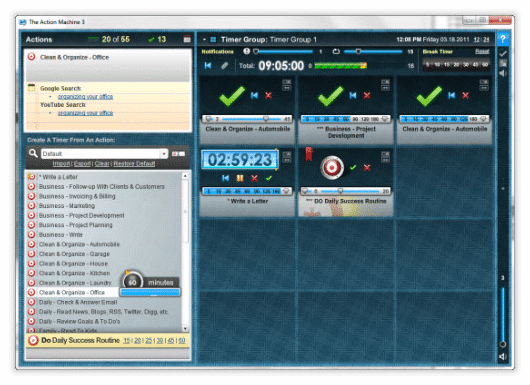
The Action Machine is completely built around the timeboxing concept, so it works because it's simple to understand and use, and it ties together the three key motivating elements that push your brain to take action (we talked about these earlier):
It turns your daily actions/tasks into mini-goals - As we discussed earlier, our brains love goals, big or small, because they're built to be goal-achieving machines. Give your brain a goal, and it immediately goes to work finding ways to reach it.
It allows you to quickly and easily assign each mini-goal a specific timeframe or deadline - Once your brain has a goal, a deadline is the fuel that motivates it act! The shorter the deadline, the more revved up your brain gets.
It shows you the BIG picture of your day with a level of clarity that helps you believe you can get it all done - Instead of getting poor results because your day is an overwhelming, uncontrollable, cloudy mess of stuff you need to do, this system breaks your day down into small, manageable pieces that you actually see yourself getting done with ease. When you believe you can, you will!
Download link: http://www.mediafire.com/?cttbqxa2j6kctjm
Thursday, September 8, 2011
3D Stereo Image capturing system based on OV3640

Long time ago I already develop 3D stereo capturing system by using OV3640 CMOS cameras.
The following pictures my implementation of 3D capture system.
Our system is consists of several parts:
Embedded board : Main microprocessor is made by Samsung S3C6410. Its 32-bit ARM11 RISC microcontroller.
Image capturing system: OV3640 CMOS camera modules, DC Servo motors and Stepper motor with motor drivers.
Display system: 3D Auto-stereoscopic LCD module(3D0-700S-2010-1-ES, 7 inch). Main LCD panel is Samsung LMS700KF05.
Next time more detail explain :).
CAN-BUS-Multi training system
Vehicles are now frequently equipped with electronic sensors and actuators to reduce the environmental impact and to increase the safety and the comfort. In order to reduce the amount of wiring, the weight of the necessary wiring harnesses and the service costs, many middle or top range vehicle types, lorries, buses and tractors are nowadays interconnected by the CAN BUS – a common two-wire connection.
The CAN-BUS training system developed by ELWE helps to study the structure, action and diagnosis of CAN-BUS systems safely and clearly in a relatively short time and without long setting-up times. The system is equipped exclusively with original body electronics components of VAG middle range cars.
The CAN BUS fault simulator enables you to set various invisible faults to systematically and practically train the field of fault
diagnosis.
The CAN-BUS training system developed by ELWE helps to study the structure, action and diagnosis of CAN-BUS systems safely and clearly in a relatively short time and without long setting-up times. The system is equipped exclusively with original body electronics components of VAG middle range cars.
The CAN BUS fault simulator enables you to set various invisible faults to systematically and practically train the field of fault
diagnosis.
The OBD II interface allows you to transmit and receive CAN BUS data protocols, so that it is also possible to obtain a detailed knowledge on the CAN BUS.
Wednesday, August 10, 2011
TAXI Framework documentation
TAXI Framework documentation
 Welcome to the Taxi documentation website ! Here you will find a variety of resources to learn about what is Taxi is all about, how it works, and more importantly, how you can use it to change the world !
TAXI is a software developped at the IMARA Lab from INRIA. It is used as plateform for our automated vehicles, the CyberCars (http://www.lara.prd.fr/). It targets both engineers who want to prepare demos, test new hardware, check if the vehicles are operational, etc., and researchers who want a quick way to implement and test new algorithms, designs, solutions.
TAXI provides an abstraction to access sensors and actuators.
TAXI implements communication tools like Zeroconf or XML-RPC for vehicle collaboration and remote control.
TAXI allows finally to build demonstration by wrapping together various algorithms.
Wednesday, August 3, 2011
WaitForSingleObject_example.cpp
//#include "stdafx.h"
//#include
//#include
int _tmain(int argc, _TCHAR* argv[])
{
// Creates a thread to execute within the virtual address space of the calling process
hTh=CreateThread(NULL,0,(LPTHREAD_START_ROUTINE)ThreadMain,(LPVOID)10,0,&ThreadID);
if(hTh==NULL)
{
wprintf(L"CreateThread() failed, error %u\n", GetLastError());
return 1;
}
else
wprintf(L"CreateThread() is OK, thread ID %u\n", ThreadID);
// Blocks/wait till thread terminates
// Waits until the specified object is in the signaled state or
// the time-out interval elapses.
// The INFINITE parameter make the function return only when the object is signaled
wprintf(L"Waiting the child thread terminates/signaled...\n");
dwRet = WaitForSingleObject(hTh,INFINITE);
wprintf(L"WaitForSingleObject() returns value is 0X%.8X\n", dwRet);
switch(dwRet)
{
case WAIT_ABANDONED:
wprintf(L"Mutex object was not released by the thread that\n" L"owned the mutex object before the owning thread terminates...\n");
break;
case WAIT_OBJECT_0:
wprintf(L"The child thread state was signaled!\n");
break;
case WAIT_TIMEOUT:
wprintf(L"Time-out interval elapsed, and the child thread's state is nonsignaled.\n");
break;
case WAIT_FAILED:
wprintf(L"WaitForSingleObject() failed, error %u\n", GetLastError());
ExitProcess(0);
}
if(CloseHandle(hTh) != 0)
wprintf(L"hTh's child thread handle was closed successfully!\n");
else
wprintf(L"Failed to close hTh child thread handle, error %u\n", GetLastError());
wprintf(L"Main process & thread ready to exit...\n");
}
The WaitForSingleObject() Example
Create a new empty Win32 console application project. Give a suitable project name and change the project location if needed.

Then, add the source file and give it a suitable name.

Project file created:
 The following source codes to add and build:
#include "stdafx.h"
#include
#include
// Thread counts till PassVal
void ThreadMain(LONG PassVal)
{
LONG i;
for(i=0;i


How can i install winxp in Compaq Presario CQ62 ?
You change the bootdisk in the BIOS to the cd. Then boot from the XP CD. And press a key when it tells you to. However, this will wipe Windows 7. So, if you want anything copy everything you want (except programs), before you format the hard drive.
Also, NOTE: XP doesnt have drivers for most of whats on the system (LAN/Sound/Card reader etc). So, if this is the only computer you've got, go to the HP site search for this laptop, download the drivers and copy them to something. Before you start. Or you wont get back on the internet..
Also NOTE: If the hard drive in this is SATA, you'll have to disable AHCI in the BIOS (change it to IDE mode). Or XP will crash before you get to the setup screen. Unless you download the SATA drivers, unzip/extract them and add them when it says to press F6 (on a floppy).
The XP CD doesn't have SATA drivers on it either. If you dont add the SATA drivers during the install, DON'T change it back to AHCI after you install XP. Or it'll crash
Also, NOTE: XP doesnt have drivers for most of whats on the system (LAN/Sound/Card reader etc). So, if this is the only computer you've got, go to the HP site search for this laptop, download the drivers and copy them to something. Before you start. Or you wont get back on the internet..
Also NOTE: If the hard drive in this is SATA, you'll have to disable AHCI in the BIOS (change it to IDE mode). Or XP will crash before you get to the setup screen. Unless you download the SATA drivers, unzip/extract them and add them when it says to press F6 (on a floppy).
The XP CD doesn't have SATA drivers on it either. If you dont add the SATA drivers during the install, DON'T change it back to AHCI after you install XP. Or it'll crash
Also, make sure you've got an XP key. A windows 7 key wont work
download winxp drivers the following links:
http://laptop-driver.blogspot.com/2010/11/compaq-presario-cq62-windows-xp-driver.html
In my case: my notebook model is Presario CQ62-303u
I try to change SATA driver mode to IDE mode, but my notebook BIOS doesn't have that choice.
The following link have some discuss of SATA driver problem in winxp installation.
1. You download CPU-Z
2. You should check chipset of notebook.
3. You should download manuals for SATA problem.
4. You download nlite
5. Read manual (3) and create winxp boot CD/DVD.
6. Intsall winxp.
Sunday, July 17, 2011
Silver pen writes circuits on any material
University of Illinois engineers have developed a silver-inked rollerball pen capable of writing electrical circuits and interconnects on paper, wood and other surfaces. The pen is writing whole new chapters in low-cost, flexible and disposable electronics.

Led by Jennifer Lewis, the Hans Thurnauer professor of materials science and engineering, and Jennifer Bernhard, a professor of electrical and computer engineering, the team published its work in the journal Advanced Materials.
“Pen-based printing allows one to construct electronic devices ‘on-the-fly,’ ” said Lewis, the director of the Frederick Seitz Materials Research Laboratory. “This is an important step toward enabling desktop manufacturing (or personal fabrication) using very low cost, ubiquitous printing tools.”
While it looks like a typical silver rollerball pen, the pen’s ink is a solution of real silver. After writing, the liquid in the ink dries to leave conductive silver pathways – in essence, paper-mounted wires. The ink maintains its conductivity through multiple bends and folds of the paper, enabling devices with great flexibility and conformability.
“The key advantage of the pen is that the costly printers and printheads typically required for inkjet or other printing approaches are replaced with an inexpensive, hand-held writing tool,” said Lewis, who is also affiliated with the Beckman Institute for Advanced Science and Technology. The ability to create freestyle conductive pathways enables new possibilities in art, disposable electronics and folded three-dimensional devices. For example, the researchers used the silver pen to sketch a copy of the painting “Sae-Han-Do” by Jung Hee Kim, which portrays a house, trees and Chinese text. The ink serves as wiring for an LED mounted on the roof of the house, powered by a five-volt battery connected to the edge of the painting. The researchers also have demonstrated a flexible LED display on paper, conductive text and three-dimensional radio-frequency antennas.
Next, the researchers plan to expand the palette of inks to enable pen-on-paper writing of other electronic and ionically conductive materials.

Subscribe to:
Posts (Atom)